See Who Is Using the Wi-Fi
NetCut, developed by Arcai.com, is a local network management tool for viewing and controlling devices connected to the same LAN or Wi-Fi network. It can display identifying details such as IP addresses, MAC addresses, and manufacturer information, then cut or restore internet access for selected clients. Its main appeal is direct device control without opening the router’s administration panel, although results depend on the network configuration.
Top Recommended Alternative

A Roll Call for Connected Devices
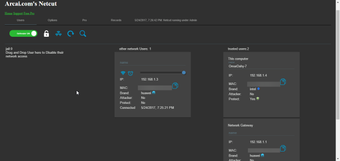
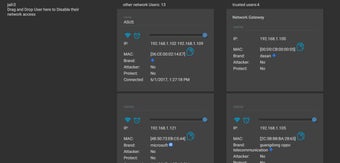
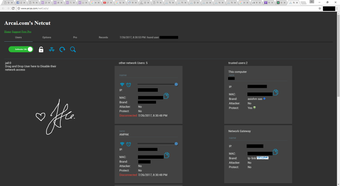
NetCut presents a live list of devices detected on the local network through ARP-based scanning. Available details can include an IP address, MAC address, hostname, and hardware manufacturer, although identification is not complete for every client. From the same interface, users can interrupt or restore a device’s internet access, making it easier to investigate unfamiliar connections or manage equipment on an authorized network.
No Router Password, No Universal Guarantee
Rather than changing settings through the router, NetCut operates within the local network and communicates with devices on the same subnet. This approach keeps setup relatively direct, but compatibility varies. Client isolation, IPv6 use, anti-spoofing protections, managed network hardware, and other router settings can prevent the utility from detecting or controlling devices as expected.
Extra Controls Come With Fine Print
Some NetCut editions provide speed limiting and MAC address modification or cloning tools for more targeted management. Availability depends on the build, account level, network adapter, and setup, so these functions are not equally reliable across every installation. Arcai also offers NetCut Defender as a separate companion utility designed to reduce exposure to ARP-spoofing attacks rather than as built-in protection within NetCut itself.
Powerful Enough to Need Permission
NetCut suits home users and small-network administrators who need quick visibility and temporary control over connected devices. Its access-cutting functions are useful on networks the user owns or manages, but they can also disrupt other people without warning. Use on public, workplace, school, or third-party networks is inappropriate without clear authorization, making responsible use as important as the program’s technical capabilities.
Useful Visibility With Clear Boundaries
NetCut offers a direct way to identify connected devices and interrupt unwanted access without signing in to the router. That convenience makes it useful for troubleshooting and basic local network management. However, compatibility depends heavily on the router and network setup, and its disruptive controls require careful, authorized use. It works best as a temporary device-management tool rather than a replacement for permanent router policies or complete network security.